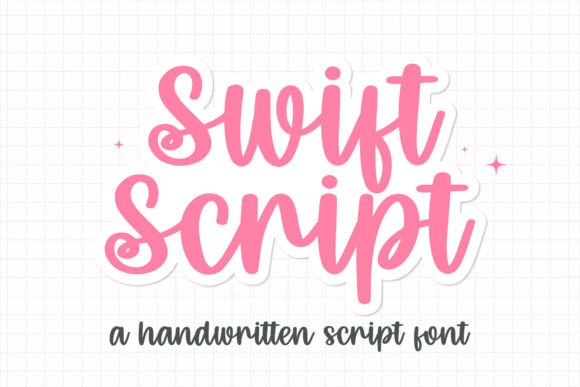
Swift Script Font Review
It was a quiet afternoon in the studio when I opened a blank brand board, ready to tackle a new project. A local boutique needed a fresh visual identity, and I wanted something that felt warm, approachable, and a little whimsical. That’s when I reached for Swift Script—a sweet and cute handwritten font that immediately caught my eye.
Swift Script for Wedding Invitations and Elegant Branding
As a display font, Swift Script shines in projects where personality and charm matter most. I tested it on a wedding invitation concept, and it brought an instant sense of elegance and intimacy. The soft curves and gentle flourishes made it feel like a personal note from a friend, perfect for capturing the emotion of a special day.
Its versatility makes it ideal for branding that needs a human touch. Whether it's a logo, a tagline, or a header, Swift Script adds a unique character that stands out without overwhelming the design. It works well with serif fonts for contrast or alongside a clean sans serif for a modern twist.
Swift Script for Social Media Graphics and Digital Branding
When I placed Swift Script on a social media layout for a handmade shop, it transformed the visuals into something more inviting. The font’s fluidity gave the content a friendly, accessible vibe that resonated with the target audience. On Instagram posts and Facebook banners, it added a touch of authenticity that felt genuine and not too polished.
For web design, I used it as a headline font on a website header. It looked great at larger sizes, drawing attention without sacrificing clarity. However, I noticed that at smaller sizes or in long paragraphs, it became less readable. That’s why I recommend using it strictly as a display or accent font rather than for body text.
Swift Script for Packaging Design and Product Labels
Testing Swift Script on a packaging mockup for a skincare line, I found it worked surprisingly well. The font’s playful yet refined style matched the brand’s aesthetic perfectly. On labels and product tags, it added a personal, artisanal feel that appealed to customers looking for something unique.
I paired it with a simple sans serif for the product description, which helped balance the design. The combination created a clean, professional look while still maintaining a warm, approachable tone. It’s a great choice for brands that want to stand out on shelves without going overboard.
Swift Script for Business Cards and Print Materials
On a business card, Swift Script made a bold statement. The font’s curves and swashes gave it a handcrafted quality that felt more personal than a standard typeface. It was especially effective when used in a short phrase or name, where its uniqueness could shine without being distracting.
However, I found that it didn’t work as well for longer text blocks. When used in a dense layout, the details in the letters started to blur, making it harder to read. For print materials, I suggest using it sparingly and ensuring there’s enough space between lines and characters to maintain legibility.
Swift Script for Logo Design and Brand Identity
When I tried Swift Script on a logo draft for a creative studio, it added a sense of creativity and individuality. The font’s softness balanced well with more structured elements, creating a dynamic visual hierarchy. It worked particularly well when combined with geometric shapes or minimalist icons.
One thing to keep in mind is that Swift Script is best suited for logos that don’t require a high level of formality. If the brand has a more corporate or traditional image, this font might not be the right fit. But for a boutique, a startup, or a lifestyle brand, it can be a powerful tool for differentiation.
Practical Tips for Using Swift Script in Real Projects
If you’re considering using Swift Script in your work, start by testing it in different contexts. Try it on a mockup, a logo, or a social media graphic to see how it performs. Pay attention to how it looks at various sizes and in different color schemes.
Also, check the font’s licensing before using it in client projects. Make sure you have the right to use it commercially, especially if it’s for branding, packaging, or digital products. Some fonts come with restrictions that can limit your creative freedom.